Sep 5, 2026

Unified Customer Experience Platform for Homebuilders
A customer asks what to expect at an upcoming pre-drywall walk. Sales has the appointment, construction has the latest progress, and the preparation guide is somewhere in an email thread. Before anyone can answer, the team has to assemble information the builder already has.
Putting those records behind the same login would make them easier to find. But someone would still need to verify the information, explain the next step, and respond when the customer has a question.
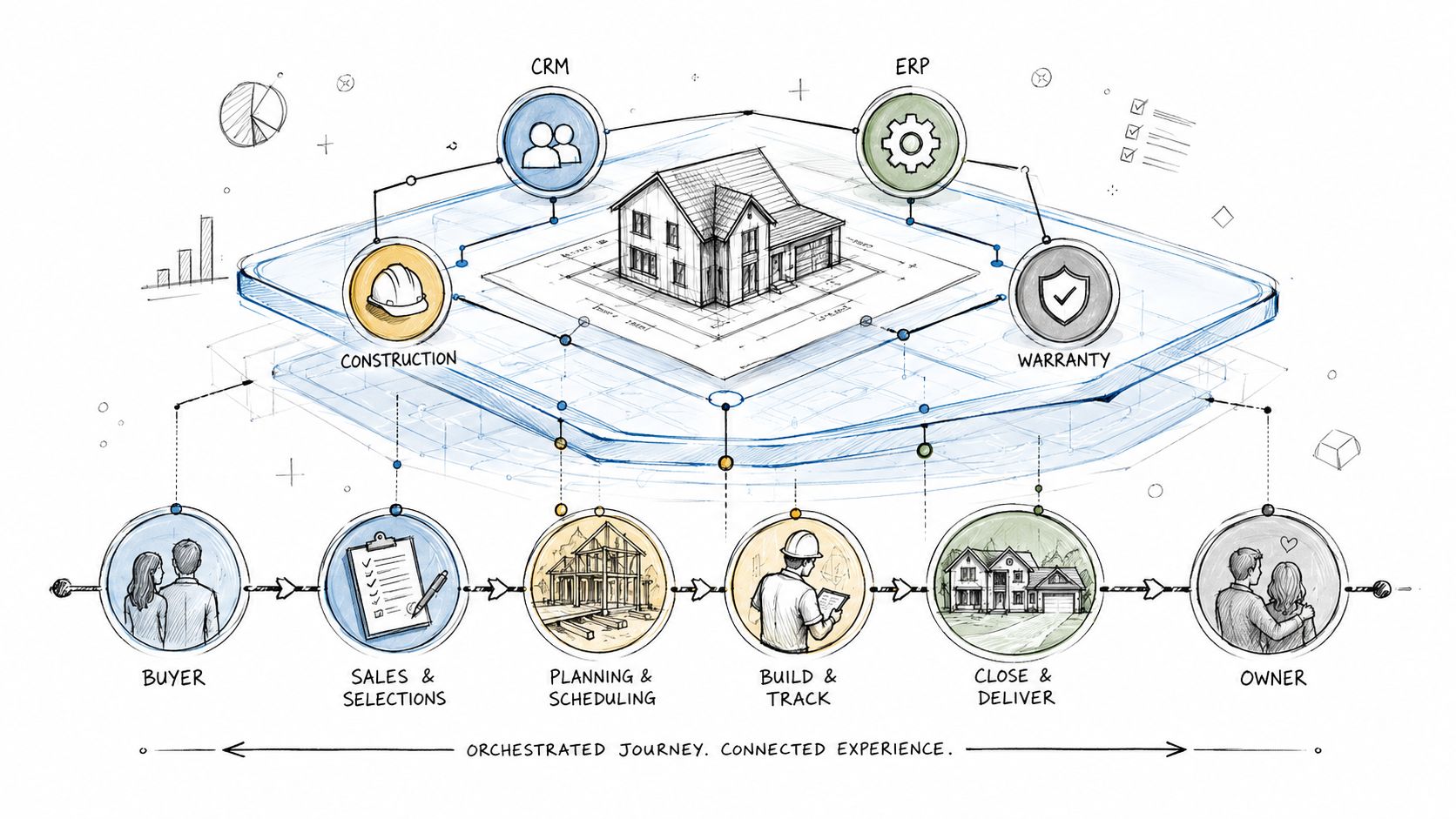
A unified customer experience platform for homebuilders connects customer communication, home information, and the work behind the relationship from contract through closing, ownership, and warranty. Its value is not simply showing more information in one place. It is helping teams deliver the next appropriate action without repeatedly coordinating it by hand.
For a builder evaluating the category, the question is practical: does the platform connect the work, or just display the pieces?
Why the Post-Contract Experience Breaks
After a contract is signed, responsibility expands across sales, design, construction, closing, and eventually Customer Care. The customer is still working with one builder, even as the people and systems supporting the relationship change.
A construction milestone can be accurate without being understandable to a customer. A document can be available without the customer knowing where to find it. A service request can be assigned without anyone explaining when the next update will arrive.
These are different problems. Better access to information helps, but access alone does not resolve an unanswered question or complete a handoff.
Diagnose the gap before buying another platform
Trace one recent interaction from the customer's question to the final answer. Look for three possible gaps: missing information, unclear responsibility, or repetitive coordination between otherwise capable systems.
When field information is missing, adding a customer-facing app will not create it. When information exists but employees repeatedly copy, interpret, and send it, a connected workflow may remove substantial administrative work. When responsibility is unclear, leaders need to establish the process before automating it.
The starting point should be the work that breaks, not an assumption that every builder needs another application.
What a Unified Customer Experience Platform Actually Is
A useful platform connects three things: the customer's context, the team's next action, and a record of what happened. That context includes the right home, relevant documents, prior communication, and the customer's current stage in the journey.
The original operational records can remain in specialized systems. The customer experience platform makes selected information useful across the relationship without becoming a second accounting system or construction schedule.
A portal, an integration, and a workflow do different jobs
Capability | What it contributes | What still needs to be tested |
|---|---|---|
Customer portal or app | A destination for information, communication, and self-service | Who keeps the content current, and where does a customer's response go? |
Integration | Movement of agreed information between systems | Is it the correct record, current enough, and usable by the receiving workflow? |
Coordinated workflow | Rules connecting an event to communication, action, and follow-through | Who verifies completion and handles an exception? |
These capabilities can exist within the same product. A portal is not inherently passive, and a product labeled a platform is not automatically connected. Evaluate what it does.
Integration moves data. A coordinated workflow puts that data to work. For example, receiving a signed-contract record is different from matching it to the correct customer and home, starting the appropriate checklist, and making the next step clear.
Foundation's approach places customer experience alongside CRM, construction management, and ERP as a fourth core business capability. That is a way to define responsibility, not a requirement to buy exactly four separate systems.
Warranty operations also need an explicit home. A builder may retain an existing warranty tool or manage that work in a connected platform such as WarrantyOS. Neither choice removes the need to define how customer submissions, appointments, and status updates are handled.
Business Benefits and KPIs Leaders Should Track
Start with the improvement the team needs, then choose a measure that shows whether it happened. A platform should not earn credit simply for sending more notifications or collecting more logins.
The following measures are starting points for an evaluation, not promised results or a claim that every product includes these reports.
Business objective | Practical measure | Quality check |
|---|---|---|
Give sales and closing teams time back | Staff time spent preparing routine updates and finding information for the same group of homes | Include time spent maintaining content and correcting errors. |
Improve customer follow-through | Required customer actions completed by the agreed deadline | Confirm completion means the requirement was met, not just that a box was checked. |
Make handoffs more dependable | Handoffs accepted without missing information or unclear ownership | Review rejected or reopened handoffs to identify the cause. |
Reduce service coordination | Repeat status inquiries and staff handling time per service request | Review unresolved issues, repeat visits, and ease of reaching the team. |
Support consistent adoption | Use of the agreed workflow by participating teams and customers | Compare similar stages and roles, rather than ranking everyone by login frequency. |
Separate operating improvements from business outcomes
Closing performance, cancellations, customer satisfaction, and referrals matter. They also have influences beyond communication software. Review the reasons behind changes before attributing them to the platform.
A decrease in warranty requests is not sufficient evidence of success. Customers may be finding helpful information, or they may be struggling to submit an issue. Pair volume with service quality and customer feedback.
The sales opportunity is similarly specific: less routine post-contract administration can create more time for prospect follow-up, appointments, and relationship building. Additional sales are an outcome to measure, not an automatic result of recovered hours.
Core Features and How the Platform Connects to Existing Systems
The most useful feature review follows a customer interaction across systems. Ask where the information begins, how it is verified, what the customer sees, and how the team continues the conversation.
Connect the right customer to the right home
Define how customer, household, home, community, and contract records relate. Test a quick move-in home, a customer changing homes, and a canceled contract. Agree on what happens to old invitations, documents, and scheduled messages in each case.
Record ownership should be explicit. A closing date might come from an ERP, a closing team, or another maintained source. Do not assume the same system owns the same information at every builder.
Only expose information appropriate for the customer. Internal notes, financial records, and vendor discussions do not become customer-facing simply because they share a home record.
Follow the reply, not just the notification
A message appearing in an app, email, or text notification does not prove those channels support the same conversation. Ask the vendor to demonstrate exactly what happens when the customer replies from each channel you plan to use.
Can the reply reach the responsible team with its context? Does the customer need to follow a link back to the portal? What must employees record after a phone conversation? Which communication remains outside the platform?
Those answers should shape customer instructions and staff training. Do not assume existing personal text threads or external inboxes become part of the shared history automatically.
Match integration timing to the commitment
For each connection, document what moves, in which direction, how often, and who handles a failure. Test with the builder's actual data rather than relying on a list of integration logos.
A scheduled data feed may suit a routine document update. A time-sensitive appointment change may require a faster path. The method should meet the workflow's needs; an API does not by itself guarantee current or complete information.
Replaying an event, correcting a date, or replacing a document should not create confusing duplicates. Ask how the proposed configuration handles each situation and which checks remain manual.
Preserve human decisions
A forecast construction date should not become a firm closing commitment without the builder's approval. An uploaded document is not necessarily complete. A categorized service request is not an approved repair.
Use automation for predictable steps while keeping verification, sensitive conversations, and consequential decisions with the appropriate people. Foundation's guide to putting the post-contract experience on autopilot explains this distinction between moving information and completing the work around it.
Homebuilder Use Cases From Contract to Ownership
The following scenarios are practical evaluation exercises. They are not customer case studies or a promise that every step is included in every platform configuration.
Contract onboarding that starts at the right stage
Use a signed contract to demonstrate how the customer and home are connected, which welcome content appears, and how the initial checklist is selected. Then repeat the exercise with a completed quick move-in home.

The second customer should not receive instructions written for someone who still has months of construction and design decisions ahead. Ask which differences are configurable and which require manual setup.
In Foundation, Closing Concierge supports the contract-to-close experience with customer communication, construction milestones, documents, action items, and guidance for next steps. Pre-contract lead management should remain a separate evaluation requirement, not an assumed extension of those capabilities.
Closing preparation that distinguishes activity from readiness
Ask a team member to request a required item, then submit an incomplete version as the customer. Review what the customer sees and how the team records the remaining action.
This tests more than document storage. It reveals whether reminders, communication, and completion standards agree. The appointment schedule, lender requirements, and construction readiness still need their own accountable owners.
Foundation's Operator tools give internal teams a place to manage customer communication and the content supporting the builder-branded experience. Evaluate the employee workflow as carefully as the customer screen, including what staff must enter themselves and what integrations or automation supply.
Ownership information that is specific to the home
After closing, ask the customer to find an appliance manual, a paint color, and the path to request service. Test a home with a product substitution, not only a model home with standard selections.
The important question is how the information is populated and kept accurate. A product catalog is useful only when the right products are associated with the right home.
Foundation's Ownership Experience carries the relationship beyond closing with home details, product information, documents, maintenance resources, communication, and service-request access. That ongoing usefulness should come before requests for reviews or referrals.
Warranty intake that connects to the work
Submit a service request with multiple issues and photos. Follow it through review, work-order preparation, vendor coordination, scheduling, and customer communication. Then change an appointment and leave one item unresolved.
This exposes an important distinction: routing a submission is not the same as managing a service operation. A form sent to an inbox can improve intake while leaving assignments and follow-up in another process.
WarrantyOS manages service requests, work orders, vendor coordination, scheduling, purchase orders and approvals, and customer communication. AI-assisted work-order preparation supports the team; it does not replace their review and judgment.
When a builder keeps another warranty system, verify how submissions reach it and how updates return to the customer. Do not assume an intake connection includes two-way status synchronization or that vendors can directly update the same record.
Implementation Roadmap and ROI
Start with one recurring problem and a defined group of homes or service requests. Closing communication may be the priority. For another builder, warranty intake or ownership information may create the larger burden.
Establish the operating agreement
Name a business owner and involve the employees who will use the workflow. Agree on the source information, customer-facing language, completion standard, exception owner, and measures of success.
Divide the implementation work into three categories: information supplied by existing systems, work handled through configured automation or provider support, and work the builder's employees will continue to perform. This makes the staffing commitment more realistic.
Establish a baseline before launch. Include the time spent finding information, preparing updates, correcting records, and answering repeated questions.
Test before inviting customers
Use a small set of representative records, including an incomplete record and a changed appointment. Check customer access, message destinations, document visibility, and the internal team's ability to recover when something goes wrong.
Agree which old spreadsheets, inbox processes, or duplicate updates will stop. Where a temporary manual step remains, assign an owner and a review date rather than letting it become an undocumented permanent dependency.
Expand when the workflow is dependable and the team can support it. A calendar milestone alone is not evidence of readiness.
Build the business case around net capacity
Compare the time needed for the same work before and after the change. Subtract the recurring effort introduced by the platform, including content upkeep, exception review, and correction.
Recovered time creates useful capacity. It becomes a cash saving only when spending actually changes. It becomes additional revenue only when the organization uses that capacity effectively and can support the connection to results. Avoid counting the same benefit twice.
Include subscription costs, internal implementation effort, integration support, training, and ongoing administration in the evaluation. Distinguish what the provider includes from what the builder must supply.
AI capabilities deserve the same discipline. Separate what is available today from what requires configuration, custom work, or a future release. Evaluate a proposed workflow on demonstrated behavior, not on the breadth of a roadmap.
Objections, Trade-Offs, and Common Questions
The right decision may be to improve an existing system rather than add one. Use objections to clarify the required operating model, not to dismiss legitimate constraints.
Question | Proof to request |
|---|---|
We already have a CRM and customer portal. What is missing? | Show the specific manual handoff the proposed platform removes and confirm whether the current tools can already handle it. |
Will our teams maintain another set of records? | Identify the authoritative source for each key field and demonstrate every remaining manual step. |
Can divisions keep different processes? | Show the relevant differences in milestones, content, access, and service workflows. Confirm what is configuration versus custom development. |
What happens when customers do not download the app? | Complete a priority task through the web experience and test the associated notification and response path. |
Will the platform replace warranty software? | Show whether it manages service work or passes submissions to another tool, including how customer status is maintained. |
How will we know the experience is connected? | Follow one event through customer action, employee follow-up, an exception, and documented completion. |
Does unified mean every channel or feature is included?
No. Confirm the precise scope. Notifications, two-way messaging, payments, electronic signatures, selection approvals, and appointment booking are different capabilities. A document center does not imply all of them are included.
The same applies to mobile access. Test the actual tasks office staff, field teams, and customers need to perform. Confirm separately how trade partners receive and respond to work.
Who owns the experience after launch?
A business leader should own the overall standard, with named operational owners for the workflows. Technology teams and the provider support the connections, but they cannot decide the builder's customer commitments alone.
Review recurring exceptions and customer questions alongside adoption. A low-use community may need better invitations, more useful content, clearer responsibilities, or a different process. More reminders are not always the answer.
What is the final buying test?
Take one real customer interaction and ask the vendor to show the source information, the customer experience, the employee's work, and what happens when the expected next step does not occur.
A unified customer experience platform earns its place when the customer gets a clearer answer and the team needs less manual coordination to deliver it. That is the standard to apply from contract through ownership and Customer Care.
More from Foundation

Technology
What's New - October 2026
From request to resolution, faster. October’s updates make it easier for Customer Care teams to move from intake to action with fewer clicks and more context.
Oct 28, 2026

Technology
What's New - September 2026
WarrantyOS, from work order to payment. September’s updates bring more of the day-to-day warranty workflow into one connected experience.
Sep 30, 2026

Marketing
New Home Portal: A Builder's Guide to the Buyer Journey
Learn what a new home portal is, the core features builders need, and how it shapes the buyer-to-owner experience across closing and early ownership.
Sep 16, 2026